

Why Your Air Purifier Stops Cleaning Air Effectively After Two Months
Buying a good True HEPA air purifier—whether a Philips, Coway, Dyson, Xiaomi, or Blueair unit—feels like an instant relief during seasonal smog spikes, pollen allergies, or wildfire smoke alerts. You plug it in, watch the AQI readout drop from bright red into reassuring green, and forget about it sitting in the corner of your bedroom.
Yet three months later, strange symptoms start showing up. The fan runs louder on Auto mode even when the windows are shut, the air quality light stubbornly stays stuck on orange or red, electricity consumption creeps higher, and a faint stale odor blows out of the top grille. In nine cases out of ten, nothing is broken inside the motor. Your purifier is simply choked with uncleaned lint, dust-caked sensors, and neglected filter stages.
Worse yet, many owners accidentally destroy expensive replacement filters by scrubbing delicate HEPA media under running tap water after following bad advice online. Keeping an air purifier running at peak efficiency takes less than ten minutes a month—if you know which parts to wash, which parts to vacuum gently, and which parts must never get wet.
Step 1: Unplug Before Opening Any Panel
Before touching grilles, latches, or internal housings, power off the unit and unplug the cord completely from the wall socket. Most modern purifiers feature magnetic safety interlock switches that cut motor power when the rear cover pops open, but those switches occasionally stick or fail. Unplugging protects both your fingers from high-RPM blower blades and sensitive circuit boards from static or accidental water droplets.
Step 2: Cleaning the Pre-Filter (Every 2 to 4 Weeks)
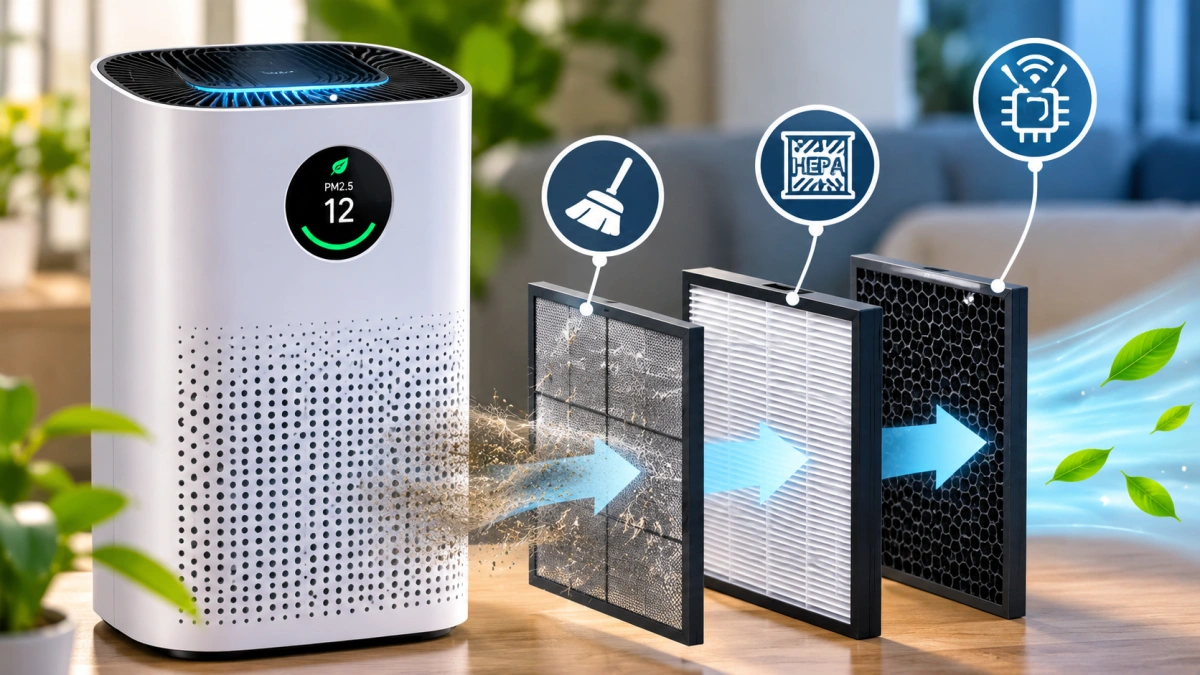
The pre-filter is the outermost mesh screen sitting right behind the air intake cover. Its job has nothing to do with microscopic smoke or viruses; instead, it acts as a protective coarse shield trapping pet hair, human hair, lint, carpet fibers, and thick dust bunnies before they clog your expensive internal HEPA cartridge.
Think of it like the lint trap on a clothes dryer: if the pre-filter is choked with grey fluff, airflow suffocates and your purifier’s Clean Air Delivery Rate (CADR) plunges.
Dry Vacuuming vs. Wet Washing
- Dry Method (Recommended for Light Dust): Pull the pre-filter out gently (take it over a trash bin or balcony so trapped fluff doesn’t fall onto your rug). Use a vacuum cleaner fitted with a soft bristle brush attachment on medium suction to lift hair and lint from the intake side.
- Wet Washing (Only If Labelled Washable): Always check your specific manufacturer manual first. Most rigid plastic-mesh pre-filters (common on Coway, LG, and Philips units) and fabric outer sleeves (common on Blueair units) are safe to rinse gently under lukewarm tap water. Never use stiff wire brushes, boiling water, bleach, or harsh detergents that can warp fine plastic frames or shrink fabric sleeves.
- The Non-Negotiable Drying Rule: If you rinse a pre-filter with water, let it air-dry 100% completely in a shaded, ventilated spot—never under harsh direct afternoon sun that warps plastic clips—for several hours before reinstalling. Putting even a slightly damp pre-filter back inside traps moisture against the paper HEPA block behind it, creating an instant breeding ground for hidden mold spores.
Step 3: Handling the True HEPA Filter (Never Wash It)
This is the single most expensive mistake air purifier owners make. Inside nearly every high-performance home unit sits a pleated white True HEPA (H13 or H14) filter built from densely tangled microscopic fiberglass or polypropylene fibers. Those microscopic gaps trap 99.97% of 0.3-micron pollutants including PM2.5 smoke, fine dust, mold spores, bacteria, and pet dander.
Why Washing Destroys True HEPA Media
Unless your product box explicitly says “Washable HEPA” (which is rare and typically a lower E11/E12 grade), never let water touch a True HEPA filter. Water pressure collapses the delicate electrostatic fiber web, creates microscopic tears invisible to the naked eye, warps paper pleats, and permanently ruins its filtration efficiency. Even worse, residual moisture deep inside pleated layers breeds musty mildew that the fan then sprays straight into your lungs.
Safe HEPA Upkeep and Replacement Timing
- Light Surface Vacuuming Only (Optional): Between replacements, you may very lightly sweep loose surface lint off the intake side using a soft vacuum brush at the lowest suction setting—never press the nozzle hard into the pleats.
- Activated Carbon Pellets / Sheets: If your purifier includes an activated carbon filter (black honeycomb or pellet grid for cooking odors, VOCs, and cigarette smoke), never wash it either. Water ruins porous carbon adsorption sites. You can carefully vacuum surface dust off carbon sheets, and replace them alongside your HEPA block.
- Replace Every 6 to 12 Months: In clean suburban environments, a HEPA cartridge lasts up to 12 months. In heavy urban pollution zones (such as Delhi NCR winters, wildfire seasons, or homes with two shedding dogs), expect replacement every 5 to 8 months, or immediately when your purifier’s replacement indicator flashes and airflow smells stale.
Step 4: Cleaning the Optical / Laser Dust Sensor (Every 2 Months)
Ever notice your purifier roaring at turbo speed all night when the bedroom air is crystal clean—or worse, showing a happy blue “005” AQI readout while the room smells smoky? The culprit is almost always a dirty PM2.5 particle sensor.
Inside a tiny recessed cavity on the side or back of the machine sits a miniature infrared LED or laser diode paired with an optical photoreceptor that counts passing dust specks. Over two months of continuous airflow, fine static dust sticks right onto the glass lens inside that sensor, blinding the machine.
5-Step Sensor Cleaning Routine
- Locate the small hinged plastic door on the side or rear panel labeled “Air Quality Sensor” or “Dust Sensor” and pop it open.
- Take a clean cotton swab (Q-tip) lightly dampened with plain distilled or filtered water (squeeze out excess liquid so it is barely damp, never dripping).
- Gently wipe the round glass optical lens and the tiny opposing air channel inside the cavity to lift film and smudge buildup.
- Immediately follow up using a second dry cotton swab to wipe away any moisture streaks.
- Wait two minutes for residual humidity to evaporate, snap the sensor cover shut, and plug the purifier back in.
Never spray rubbing alcohol, glass cleaner, or compressed air directly into a laser PM2.5 module—alcohol can haze plastic optical lenses, and high-pressure canned air can dislodge delicate internal mirror alignments.
Step 5: Exterior Grilles, Intake Vents, and Maintenance Schedule
Finally, take thirty seconds to wipe down the outer casing and top air-outlet fins using a slightly damp microfiber cloth. Dust settled around top exhaust louvers gets blasted right back into your bedroom ceiling the moment Turbo mode kicks on. Never spray liquid cleaners directly onto top touch controls or fan openings.
Component
How Often to Service
Can You Wash With Water?
Recommended Action
Pre-Filter Mesh / Fabric
Every 2–4 weeks
Yes (if manual confirms washable)
Vacuum gently or rinse lukewarm; dry 100% before reinstalling
True HEPA Cartridge
Check every 2 mo; replace 6–12 mo
NO (Destroys fibers)
Very light surface vacuum only; replace when dark grey/clogged
Activated Carbon Filter
Replace every 6–12 months
NO (Ruins odor pores)
Lightly vacuum dust off intake side; replace when odors return
Optical / Laser Dust Sensor
Every 2 months
Barely damp cotton swab only
Wipe lens gently with damp Q-tip, then dry Q-tip immediately
Exterior & Air Vents
Every 2–4 weeks
Damp microfiber cloth only
Wipe intake grilles and top exhaust louvers clean
Frequently Asked Questions (FAQ)
Can I wash my air purifier’s HEPA filter if I let it dry in the sun?
No. Unless the manufacturer specifically engineered and labeled it as a “Washable HEPA” filter, washing a standard True HEPA filter permanently damages the tangled microscopic glass/synthetic fiber matrix. Even after drying, filtration efficiency drops sharply and trapped moisture can cause mold.
Why is my air purifier AQI light always stuck on red or high speed?
When a purifier stays stuck on red despite clean indoor air, the laser or infrared dust sensor lens is usually coated with fine dust. Cleaning the sensor window behind the side door with a barely damp cotton swab and drying it usually restores normal readings immediately.
Can I vacuum a HEPA filter to make it last longer?
Lightly brushing surface fluff off the outer intake side of a HEPA filter on low vacuum suction can prevent coarse buildup if your pre-filter missed some hair, though it will not unclog embedded microscopic PM2.5 smoke particles. You still must replace the filter every 6 to 12 months.
How do I know when it is actually time to buy a new HEPA filter?
Beyond your machine’s built-in filter timer light, check three real signs: the white pleated paper has turned dark charcoal grey throughout, airflow coming out of the top feels noticeably weaker on high fan speed, or a sour/musty smell lingers when the unit runs.
Does leaving an air purifier running 24/7 ruin the motor?
No. Modern DC brushless air purifier motors are engineered specifically for continuous 24/7 operation while drawing very low wattage on sleep or auto speeds. Keeping the pre-filter clean prevents motor strain and keeps power draw minimal.











Comments (0)
No posts yet
Be the first to comment!